Booking/Changing Your Driving Test – New Process
Due to recent changes introduced by the DVSA, only the candidate (student) is permitted to book a driving test directly.
To continue helping you secure an earlier test date, we’ve developed a simple software tool that searches for and secures suitable test slots in real time.
Once a suitable test is found, you will get an email as before and you will have the option to confirm the test, once confirmed you will be able to complete the booking yourself quickly and easily.
To get started, please download and install the software using the button below. Once installed, it will run in the background and notify you when a suitable test becomes available.
This ensures you stay fully compliant with the new regulations while still benefiting from our fast search and booking technology.
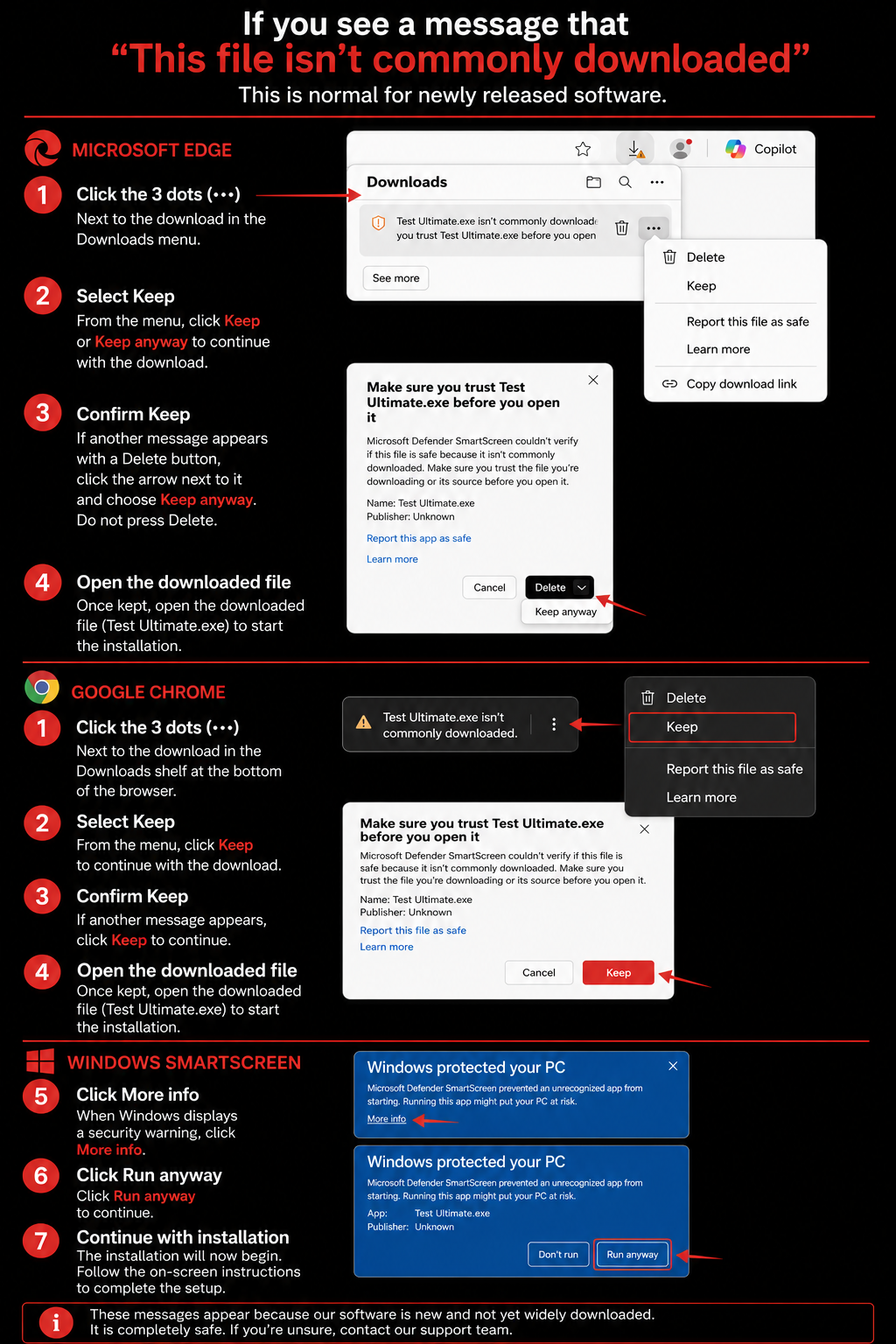
Some browsers or Windows devices may display a message such as “This file isn’t commonly downloaded” or “Windows protected your PC.”
This is normal for newly released software.
If you see this message:
- In some browsers, you may need to click the 3 dots (...) next to the download first, then select Keep or Download anyway in your browser. You may also get another message that gives the option to delete, make sure not to press delete and rather this should have an arrow next to it to press keep
- Open the downloaded file.
- If Windows displays a security warning, click More info.
- Then click Run anyway.
Please ensure you only download the software directly from Test Ultimate using the button on this page.